
Run Smarter PhotoboothFrom Anywhere
Run Smarter PhotoboothFrom Anywhere
As of October 2026, Pixture photo booth software runs 571 registered booths across 24 countries, with 51,275 photo sessions completed.
Built for your setup
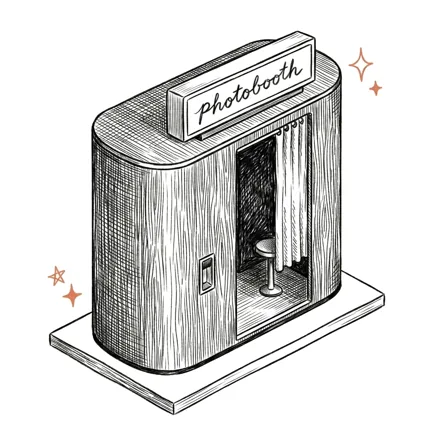
One booth, one location. The classic setup — templates, payments, and revenue managed from the cloud.
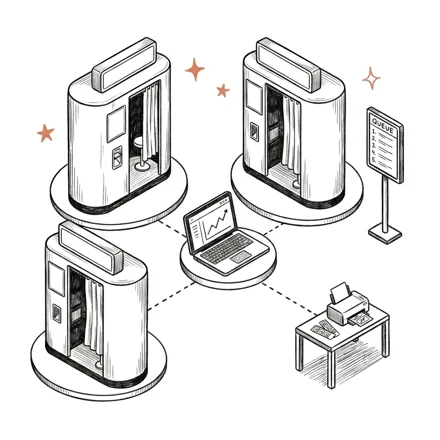
Several booths under one hub with a shared print queue, a central cashier and one online shop link. The Korean-style setup found in malls or a dedicated room with a bunch of booths.
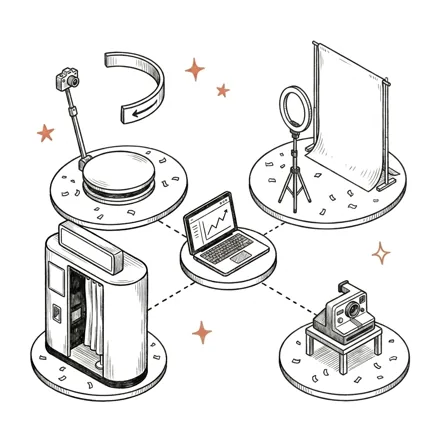
Single booths plus event formats — roaming booth, video booth, 360, glambooth — built for weddings and brand activations.
See it in action
Push templates, branding, and settings to every booth in real time — from one dashboard.
Pixture is photo booth software built for booth business owners. One photo booth app for Mac and Windows, managed from the cloud. New to the business? Start with our guide.
Control and manage your photo booths from anywhere. Push updates, manage templates, customize kiosk appearances, monitor sessions, and troubleshoot remotely.
Upload your .PNG templates and Pixture automatically detects and fills all photo slots for you — no manual setup needed.
Turn any design from your graphics editor into an interactive kiosk interface with a drag-and-drop canvas editor.
Apply built-in filters or upload your own .CUBE LUT color grading files for custom photo styling.
Track sessions, prints, and revenue across all your booths. Know exactly how your business is performing.
Connect and control Canon, Nikon, Sony and Fujifilm cameras, or a webcam. Switch between them on the fly.
Create animated GIFs, Live Photos, singles, and prints — not just static composites.
Auto-sync upload queue ensures no photos are lost, even without internet.
Works with all types of printers — if it connects to your PC, it prints.
Guests scan a QR code to access branded sharing pages and instantly download their photos.
Monitor connectivity, network, memory usage, temperature, and uptime for precise troubleshooting.
Move Pix Pro from one computer to another, all from your dashboard.
Connect your own DOKU, Xendit, or Midtrans account. Guests pay you directly via QRIS — Pixture takes a 0% cut of your sales.
Monitor booths, health, and revenue from your phone. Manage your whole fleet from anywhere with the Pixture mobile app.
Your customers design their own frame, pay from their phone, and pick it up at your booth as a one-of-a-kind print — same booth, more revenue.
Operator reviews
I’m so glad I found Pixture.io! The Pix team handled my onboarding and helped customize every detail to get my first permanent pay-per-use photo booth location up and running. They were incredibly responsive, patient, and always friendly, and made sure everything was tailored to my workflow and style.
The software itself is very user-friendly and easy to navigate. I especially love that I can manage and update everything through the web-based admin portal without having to work directly in the photo booth application.
I’m very happy with the functionality, support, and overall experience. Highly recommend Pixture.io!
We run 11 booths and I used to visit each one just to check it was alive. Now I look at my phone. If a printer jams or a camera drops, I know before the venue calls, and I show up with the right part instead of guessing.
Changing a template across every booth takes a minute, not a day of driving. And Frame Lab is why the same booths earn more: guests design their own frame, pay from their phone, and pick up a print nobody else has.
Thirty-one thousand sessions in, it just keeps running.
Really enjoying Pixture.io! The UI Editor lets us turn a simple flat JPG design into a fully interactive photobooth app, then update the UI/UX instantly from the dashboard, from anywhere.
Frame Lab also gives us more opportunities to generate additional revenue. And the pricing is a big plus, especially compared to competitors that can cost 2–3x more. Great value overall!
Start free and upgrade when you're ready.
Free to download. One computer, watermarked on every photo and print, not for paid events. Pix Design and Marketing Studio are open to try, saving needs Pix Pro.
Premium Experiences
per computer · Billed yearly ($300/yr)
One device runs one computer. A computer past your subscription stays paired, it just will not start a session until you deactivate one or add another.



 Any USB webcam
 OBS Virtual Camera
Printers
OBS Virtual Camera
Printers

 Kodak
Kodak
 Any Mac or Windows printer
Payments
Any Mac or Windows printer
Payments

 DOKU
DOKU

 Xendit
 Stripe
 CASH Interface
Runs on
macOS
Windows
CASH Interface
Runs on
macOS
Windows
Pix Starter is free on one computer, with a watermark and not for paid events. An Event Pass gives you 24 hours of Pix Pro on one computer for $5. Pix Pro is $40 a month or $300 a year per computer, and every paid plan includes the dashboard, editors, payments and sharing.
Yes. Pixture is a desktop app for both macOS and Windows, and one account runs a mix of both. There is no iPad app.
Canon EOS DSLR and mirrorless cameras, Nikon Z mirrorless, Sony Alpha from the A7 IV and A6700 generation, Fujifilm X and GFX, plus any USB webcam or virtual camera. Test your exact camera body with the free plan before an event.
By QRIS through your own DOKU, Midtrans or Xendit account, by card or QR through Stripe, with a card reader such as Stripe Terminal or Nayax, or with coin and bill acceptors. The money goes straight to your own account, not through Pixture.
Yes. Capture and printing keep working offline, and photos sync to the dashboard when the connection comes back. Online payments such as QRIS need a connection, so keep a backup modem at busy locations.
Yes. One dashboard shows revenue, booth health and sessions for every booth, and template or screen changes reach all of them remotely. Booths in one location can share a print queue and a central cashier.
Start free and upgrade when you're ready.
Start FreeNo credit card required. Plans start free. See pricing.
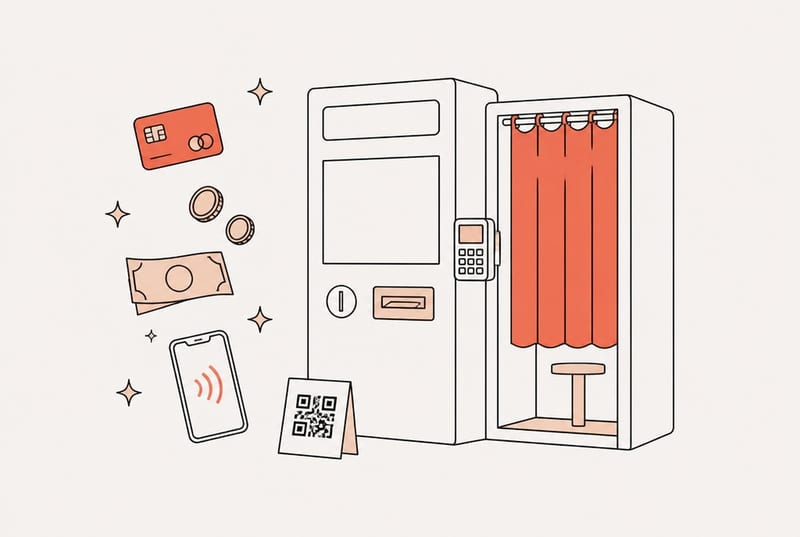
How a self-service photo booth takes payment in 2026: Nayax and Stripe Terminal card readers, coin and bill acceptors, QR codes on the guest's phone, or free play. Real hardware costs, fees per sale, and which option fits which booth.

A Canon camera not detected on a PC is almost always a cheap fix: a charge-only cable, Wi-Fi left on, or EOS Utility holding the connection so the booth software cannot see it. The full checklist, cheapest-first, plus prevention for booth duty.

A Kodak paper jam mid-event usually clears from the operator panel, no tools needed. The Paper Rewind trick for the 605, 6800 and 6850, the drawer procedure for the 305, what the error messages mean, when it is really hardware, and the habits that stop repeat jams on booth duty.